Q-Info in ISQ
Q-Info enables you to include additional information when items are displayed in Inventory Status Inquiry (ISQ). The information available for Q-Info to display is detailed in Background: Document Message Maintenance.
Define Data To Display
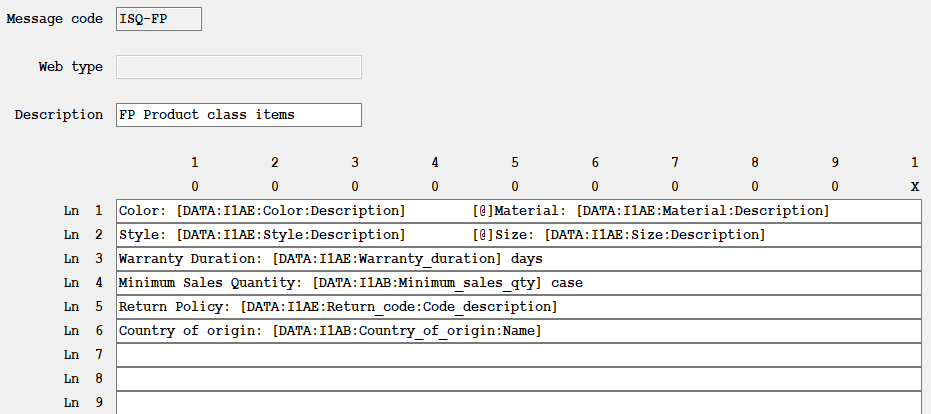
Create a message in Document Message Maintenance (TRST) to specify text, placement, and information you want displayed. To create a default Q-Info window, create a message code ISQ-* (asterisk). The specified information is displayed on the ISQ screen.
You can also create product class-specific Q-Info displays by assigning the message code ISQ- followed by a product class. Product classes are defined in Product Class Codes Maintenance (TPC) and assigned to items in Enterprise Item Maintenance (IM). Whenever an item with the associated product class is displayed, the Q-Info message is also displayed.
Example:
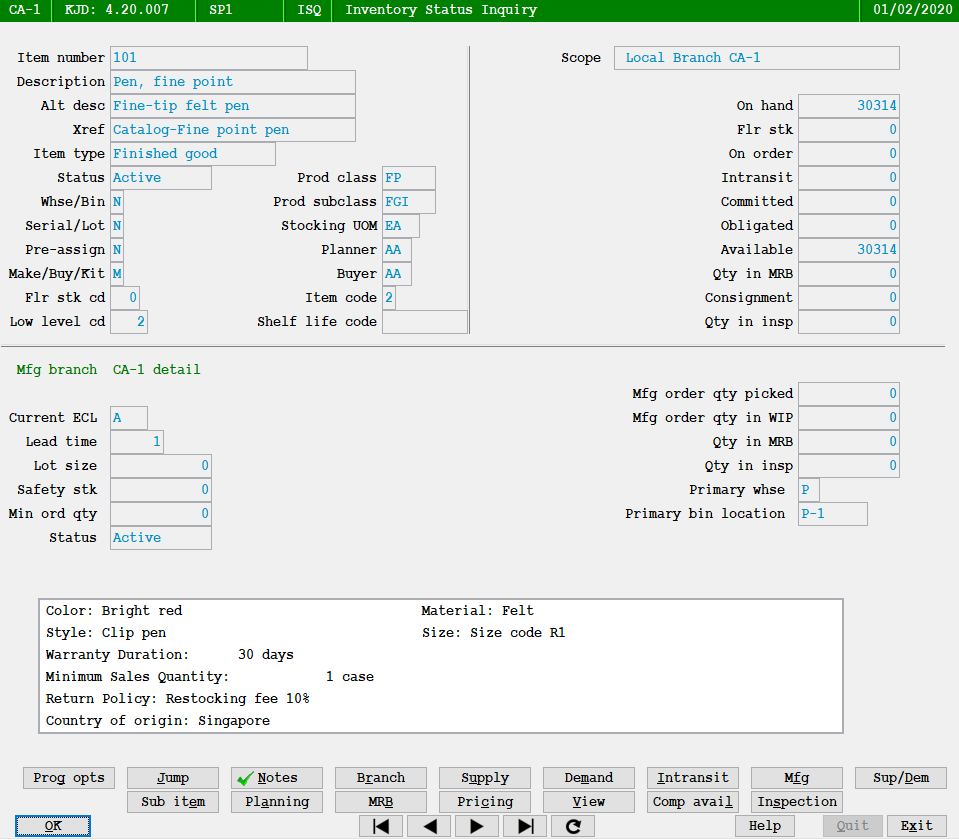
Suppose you want to display additional information when an item assigned to product class FP is sold.
Use Document Message Maintenance (TRST) to create message code ISQ-FP as follows:
When an item with product class FP item is entered, the Q-Info window is displayed below standard fields: